TI-89TROUBLESHOOTING
TI-89 Not Turning On, Error Messages and Resetting: What to Try
Your TI-89 is not turning on, the screen stays blank even with new batteries, or it freezes on an error message. Most of the time the calculator is fine, and one of the checks below brings it back.
Work through them in order: the first ones are quick and keep your stored work, the later ones can clear memory.
1. Check the contrast first
A TI-89 Titanium that seems dead is often just set to the lightest contrast. The screen is on, you simply cannot see it. Press ON once, then hold the diamond key and press + a few times to darken the screen:
If the screen turns too dark, use ◆ and − to lighten it again. After a battery change or a reset, the contrast is the first thing to check.
2. Batteries: four AAA plus a backup cell
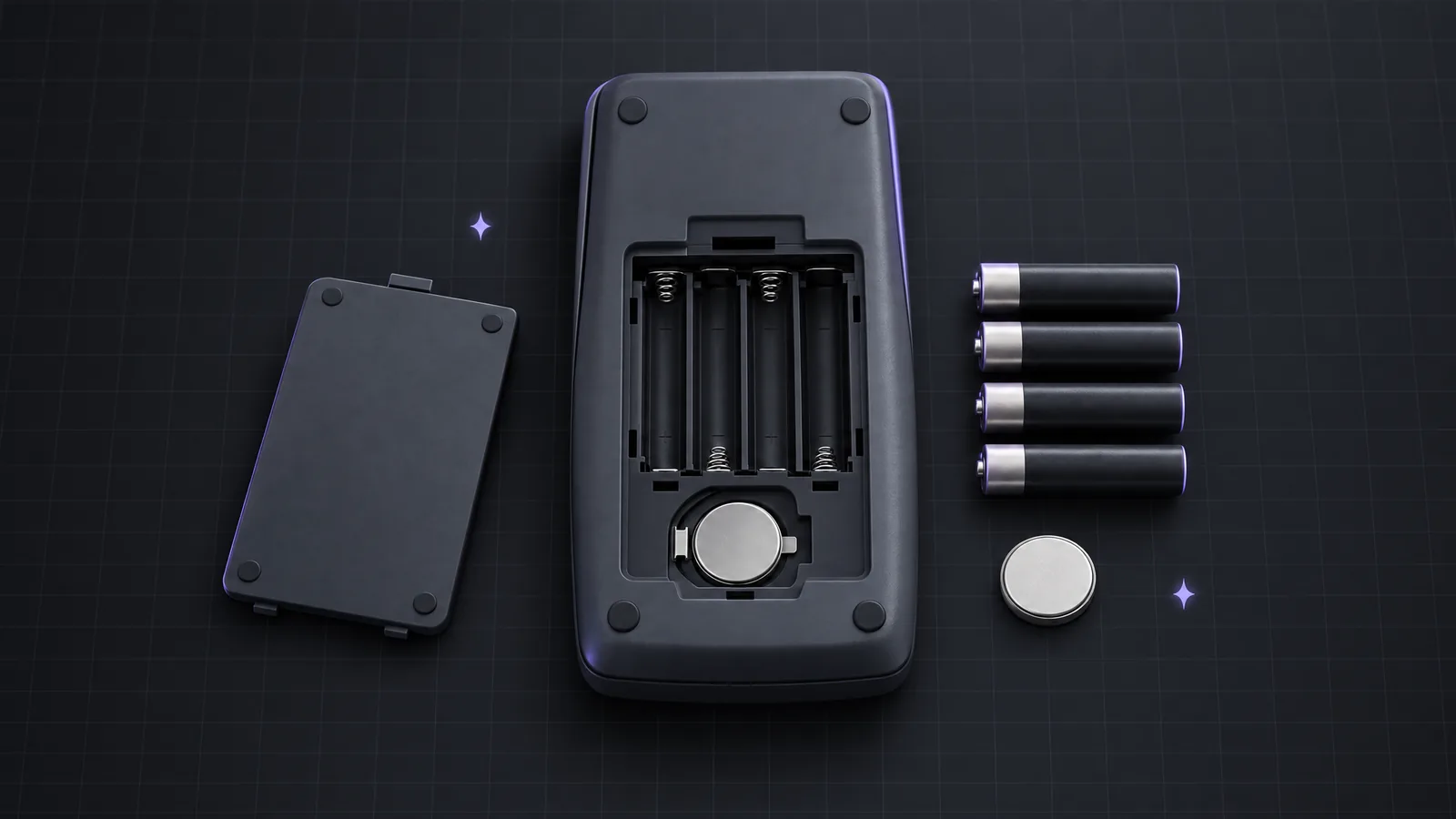
The TI-89 Titanium runs on four AAA batteries. A small silver button cell next to them is a backup battery: it keeps your memory alive while you swap the AAA batteries, but it cannot run the calculator on its own.
- Put in four fresh AAA batteries of the same type and check each one faces the way the markings in the compartment show. One reversed battery is enough to keep the calculator off.
- Do not remove the AAA batteries and the backup cell at the same time, or memory is lost.
- When the batteries get low, the status line at the bottom shows BATT. Replace them soon; a calculator on weak batteries can freeze or behave erratically.
- The backup cell lasts a long time, but if memory is lost every time you change the AAA batteries, it is probably empty. The guidebook names the exact type.
3. Stop a running program
If the screen shows BUSY in the status line and nothing reacts, a program or a long calculation is still running. Press ON to break it. You get a Break message; press ESC and you are back on the home screen.
4. Reset a frozen TI-89 Titanium
When the calculator is frozen and ON does nothing, use the key reset: press and hold 2nd, ◄ and ►, then press ON while you keep holding them. Release all keys once the screen restarts.
This is the reset most people mean by "hard reset". Anything you have not archived can be lost. If the keys do not respond at all, take out one AAA battery for a few seconds and put it back, which also restarts the calculator.
5. Reset memory or go back to factory settings
To clear memory on purpose, for example before a test or when errors keep returning, open the MEM screen and choose Reset:
The menu lets you choose how much to reset. A full reset deletes your variables, programs and functions and returns the modes to their defaults, so archive or back up anything you want to keep. The TI-89 Titanium guidebook lists exactly what each option deletes; read it before you confirm.
If the calculator still will not start after a full reset, the operating system may be damaged. TI's computer software can send a fresh OS over the USB cable. If that fails as well, the hardware is the likely cause.
Error messages and what they mean
Some "broken" calculators are really error messages. These are the ones people search for most:
| Error | What it means | What to try |
|---|---|---|
| Memory | There is not enough free RAM for the calculation or the variable. | Delete or archive variables you no longer need in VAR-LINK. |
| Dimension | List or matrix sizes do not fit together, or an index points past the end. | Check the sizes: both lists the same length, matrix rows and columns compatible. |
| Domain | An argument is outside the range the command or setting accepts. | Read the argument order of the command and check window or mode values. |
| Non-algebraic variable in expression | A letter like x already holds a value or a list. | Clear it with DelVar, or clear all one-letter variables with NewProb. |
| Address Error | A low-level crash, often after an assembly program or corrupted memory. | Reset with 2nd, ◄, ► and ON; if it keeps coming back, reset memory. |
Memory problems are handled in VAR-LINK, where you see every variable with its size:
The non-algebraic variable error is the classic one in algebra class: you stored 5 in x for one problem, and the next solve( or factor( uses that 5 instead of the letter. Clear the letter and the command works again:
| Input | Result |
|---|---|
| 5→a | 5 |
| DelVar a | Done |
| a | a |
| 7→b | 7 |
| NewProb | Done |
| b | b |
After DelVar, a is a plain letter again. NewProb clears all one-letter variables at once, which is a good habit at the start of every new problem.
When the TI-89 will not come back: keep doing your homework
Sometimes the hardware is simply worn out: a cracked screen, a corroded battery contact, a key that no longer registers. Until you have a replacement, you can keep working with Calc89, a CAS graphing calculator app intended for use with TI-89 Titanium. It uses the same command names and key sequences, so DelVar, NewProb and every command from your class notes work the same way, and nothing needs batteries or a reset.
The camera scanner reads the problem from your worksheet, and the tutor shows the keys step by step. For exams, keep in mind that phone apps are not permitted; for test day you still need a handheld your exam allows.
Frequently asked questions
Why is my TI-89 not turning on with new batteries?
Most often the contrast is set so light that the screen looks blank. Press ON, then hold ◆ and press + several times. Also check that all four AAA batteries face the right way.
How do I reset a TI-89 Titanium?
If it is frozen, hold 2nd, ◄ and ►, then press ON. To reset memory on purpose, open MEM with 2nd 6 and use F1 Reset. Anything you have not archived can be lost, so see the guidebook first.
What does Address Error mean on a TI-89?
It is a low-level crash, often after an assembly program or corrupted memory. The calculator usually freezes, and a reset with 2nd, ◄, ► and ON is the way out.
Related pages
More from the blog
- TI-89 Titanium vs TI-Nspire CAS: Which CAS Do You Need for Engineering?Keys, display, documents, CAS power and exam rules: how the TI-89 Titanium and the TI-Nspire CAS differ, and which one fits engineering.
- TI-89 vs TI-84 for Calculus: What a CAS AddsExact symbolic answers versus numeric ones, side by side: what the TI-89 Titanium adds over the TI-84 and when each one makes sense.
- Taylor Series, Sums and Sequences on the TI-89taylor( for Taylor polynomials, Σ( for sigma notation, sum( and seq( for lists, plus partial sums, products and infinite series on the TI-89 Titanium.